Overview
fasterbench is a comprehensive benchmarking toolkit for PyTorch models. It measures five critical dimensions of model performance:
Size Disk size, parameter count
Deployment storage, download time
Speed Latency, throughput
User experience, serving costs
Compute MACs (operations)
Hardware requirements, energy use
Memory Peak/average memory
GPU memory limits, batch sizes
Energy Power, CO₂ emissions
Operating costs, sustainability
Key Features
Typed results - BenchmarkResultBackward compatible - Dict-like access for existing codeSelective metrics - Benchmark only what you needMulti-device - CPU, CUDA, and multi-GPU supportExport formats - DataFrame, JSON, summary reports
1. Basic Benchmarking
The benchmark()
import torchfrom torchvision.models import resnet18, mobilenet_v3_large, efficientnet_b0from fasterbench import benchmark, BenchmarkResult# Create sample input = torch.randn(1 , 3 , 224 , 224 )# Benchmark a model (using fast metrics for demo) = benchmark(resnet18(), dummy, metrics= ["size" , "speed" , "compute" ])
═══ Size ════════════════════════════════════
  Disk:   44.67 MiB
  Params: 11.69M
═══ Speed ═══════════════════════════════════
  cpu: 33.59 ms  │  29.8 inf/s  │  p99: 61.68 ms
  cuda: 0.64 ms  │  1562.1 inf/s  │  p99: 0.66 ms
═══ Compute ═════════════════════════════════
  MACs: 1824.0 M
2. Typed Access
BenchmarkResult
# Size metrics print (f"Disk size: { result. size. size_mib:.2f} MiB" )print (f"Parameters: { result. size. num_params:,} " )# Speed metrics (keyed by device) print (f" \n CPU latency: { result. speed['cpu' ]. mean_ms:.2f} ms" )print (f"CPU throughput: { result. speed['cpu' ]. throughput_s:.1f} inf/s" )print (f"CPU p99 latency: { result. speed['cpu' ]. p99_ms:.2f} ms" )# Compute metrics print (f" \n MACs: { result. compute. macs_m:.1f} M" )print (f"MACs available: { result. compute. macs_available} " )
Disk size: 44.67 MiB
Parameters: 11,689,512

CPU latency: 33.59 ms
CPU throughput: 29.8 inf/s
CPU p99 latency: 61.68 ms

MACs: 1824.0 M
MACs available: True
3. Backward-Compatible Dict Access
For compatibility with existing code, BenchmarkResult
# Dict-style access print (result["size_size_mib" ])print (result["speed_cpu_mean_ms" ])# Iteration print (" \n All metrics:" )for key, value in result.items():print (f" { key} : { value} " )
44.66535472869873
33.58930969238281

All metrics:
  size_disk_bytes: 46835019
  size_size_mib: 44.66535472869873
  size_num_params: 11689512
  speed_cpu_p50_ms: 29.3856258392334
  speed_cpu_p90_ms: 37.92195129394532
  speed_cpu_p99_ms: 61.68484344482422
  speed_cpu_mean_ms: 33.58930969238281
  speed_cpu_std_ms: 11.55258846282959
  speed_cpu_throughput_s: 29.77137693981172
  speed_cuda_p50_ms: 0.6376160085201263
  speed_cuda_p90_ms: 0.6466431796550751
  speed_cuda_p99_ms: 0.6631737768650058
  speed_cuda_mean_ms: 0.6401805281639099
  speed_cuda_std_ms: 0.009303152561187744
  speed_cuda_throughput_s: 1562.0593816998492
  compute_macs_m: 1824.034
4. Comparing Multiple Models
Export results to a pandas DataFrame for easy comparison:
import pandas as pd# Benchmark multiple models = {"ResNet-18" : resnet18(),"MobileNet-V3" : mobilenet_v3_large(),"EfficientNet-B0" : efficientnet_b0(),= {}for name, model in models.items():= benchmark(model, dummy, metrics= ["size" , "speed" , "compute" ])# Combine into DataFrame = []for name, r in results.items():= {"model" : name, ** r.as_dict()}= pd.DataFrame(rows)"model" , "size_size_mib" , "size_num_params" , "speed_cpu_mean_ms" , "compute_macs_m" ]]
0
ResNet-18
44.665355
11689512
36.195747
1824.034
1
MobileNet-V3
21.107375
5483032
9.795851
234.838
2
EfficientNet-B0
20.453475
5288548
15.414814
415.145
5. JSON Export
Serialize results to JSON for logging or storage:
# Export to JSON = result.to_json()print (json_str)
{
  "size_disk_bytes": 46835019,
  "size_size_mib": 44.66535472869873,
  "size_num_params": 11689512,
  "speed_cpu_p50_ms": 29.3856258392334,
  "speed_cpu_p90_ms": 37.92195129394532,
  "speed_cpu_p99_ms": 61.68484344482422,
  "speed_cpu_mean_ms": 33.58930969238281,
  "speed_cpu_std_ms": 11.55258846282959,
  "speed_cpu_throughput_s": 29.77137693981172,
  "speed_cuda_p50_ms": 0.6376160085201263,
  "speed_cuda_p90_ms": 0.6466431796550751,
  "speed_cuda_p99_ms": 0.6631737768650058,
  "speed_cuda_mean_ms": 0.6401805281639099,
  "speed_cuda_std_ms": 0.009303152561187744,
  "speed_cuda_throughput_s": 1562.0593816998492,
  "compute_macs_m": 1824.034
}
6. Human-Readable Summary
Get a quick overview of all metrics with summary():
═══ Size ════════════════════════════════════
  Disk:   44.67 MiB
  Params: 11.69M
═══ Speed ═══════════════════════════════════
  cpu: 33.59 ms  │  29.8 inf/s  │  p99: 61.68 ms
  cuda: 0.64 ms  │  1562.1 inf/s  │  p99: 0.66 ms
═══ Compute ═════════════════════════════════
  MACs: 1824.0 M
7. Selective Metrics
Only compute what you need for faster benchmarking:
= benchmark(resnet18(), dummy, metrics= ["size" , "compute" ])print (f"Size: { quick_result. size. size_mib:.2f} MiB" )print (f"MACs: { quick_result. compute. macs_m:.1f} M" )print (f"Speed measured: { bool (quick_result.speed)} " ) # False - not requested
Size: 44.67 MiB
MACs: 1824.0 M
Speed measured: False
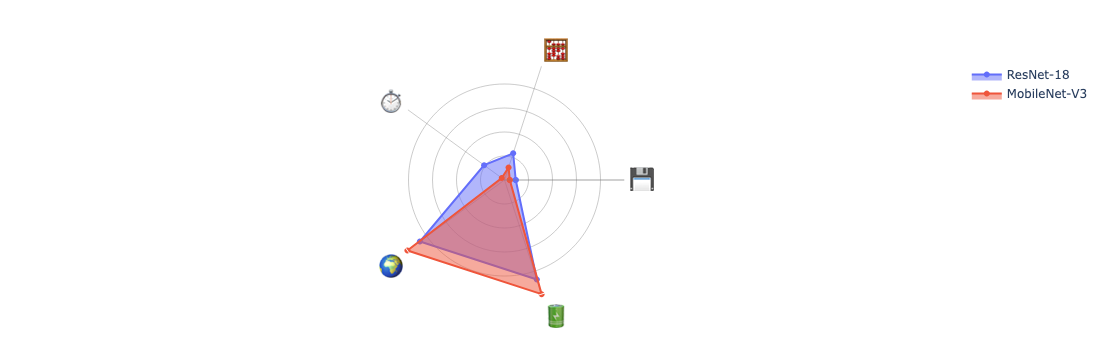
8. Visualizing with Radar Plots
Compare models visually using radar plots:
from fasterbench.plot import create_radar_plot# Full benchmark for radar plot (includes energy) = torch.randn(8 , 3 , 224 , 224 )= benchmark(resnet18(), dummy_batch,= ["size" , "speed" , "compute" , "energy" ])= benchmark(mobilenet_v3_large(), dummy_batch,= ["size" , "speed" , "compute" , "energy" ])
# Create radar plot comparing models = create_radar_plot(= ["ResNet-18" , "MobileNet-V3" ]
Summary
benchmark()Main entry point for comprehensive benchmarking
BenchmarkResultTyped container with IDE autocomplete
Dict access Backward-compatible result["key"] access
summary()Human-readable formatted output
to_dataframe()Export to pandas DataFrame
to_json()Serialize to JSON string
create_radar_plot()Visual model comparison